- Version
- Download 1
- File Size 169.73 KB
- File Count 1
- Create Date November 20, 2025
- Last Updated November 20, 2025
Subject Learning Progress Checklist – Editable MS Word Template
A comprehensive, ready-to-use checklist that helps teachers, tutors, and parents track student progress across topics, skills, and learning goals — fully customizable in Microsoft Word.
What This Template Includes
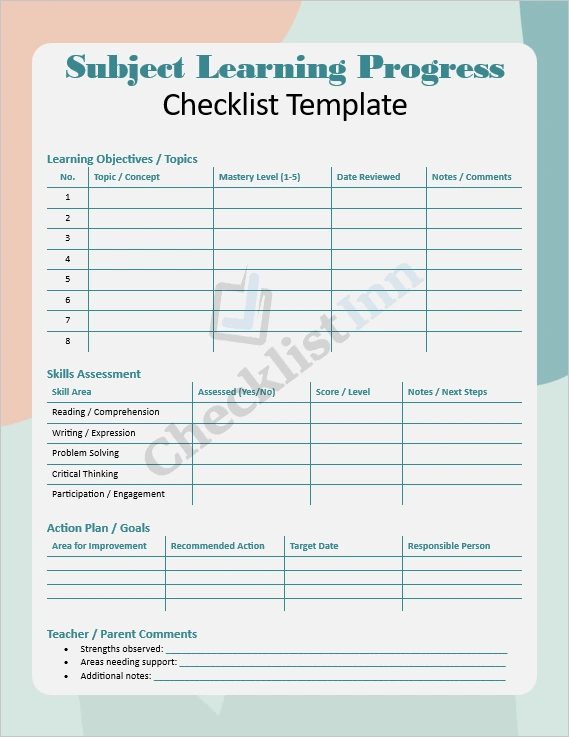
- Student Profile Section: Easily record key student details like name, grade, subject, and assessment dates.
- Learning Objectives Table: List topics or concepts along with mastery levels, review dates, and teacher notes.
- Skills Assessment Grid: Track development in core skill areas such as comprehension, writing, critical thinking, and participation.
- Action Plan & Goals: Set specific, measurable improvement goals, assign responsibilities, and set target dates.
- Comments & Feedback: A dedicated space for teacher or parent observations, strengths, and areas for support.
Why You’ll Love It
- Simple & Structured: The layout is clean and intuitive, making tracking easier and more consistent.
- Fully Editable: Built in MS Word — you can adapt, expand, or modify tables and questions to fit your context.
- Versatile Usage: Works for different age groups, subjects, and learning settings (classroom, homeschool, tutoring).
- Goal-Oriented: Encourages not just tracking, but reflection and goal-setting — helping improve outcomes.
- Time-Saving: Save time every term — no need to build a checklist from scratch. Use the template as many times as needed.
Who It’s For
- Teachers who want a clear daily or weekly tracking tool for individual students
- Tutors who need to monitor progress across multiple sessions
- Parents who are actively managing their child’s learning
- School Administrators who want a standard template for progress meetings or portfolios
How to Use It
- Download & Open – After purchase (or download), open the
.docxfile in Microsoft Word. - Customize to Your Needs – Add or remove rows depending on the number of topics, skills, or students.
- Fill It Out Regularly – Use it after tests, lessons, or each learning unit to reflect on progress.
- Review & Reflect – Use the Action Plan section to set goals and track improvements.
- Share & Collaborate – You can print it, send it digitally, or save filled checklists for parent-teacher conferences.
Download Now — Get your Subject Learning Progress Checklist template today and start tracking student growth with confidence.